Huawei Shopee: How to Install and Shop on Your Phone

Shopee is the kind of app people usually want working on day one. You may need it for daily purchases, vouchers, delivery tracking, chat with sellers, or local deals that are easier to find in the app than on a desktop site. On a Huawei phone, the cleanest approach is to start with AppGallery and make sure the basic shopping flow works before adding anything else.
Start with AppGallery
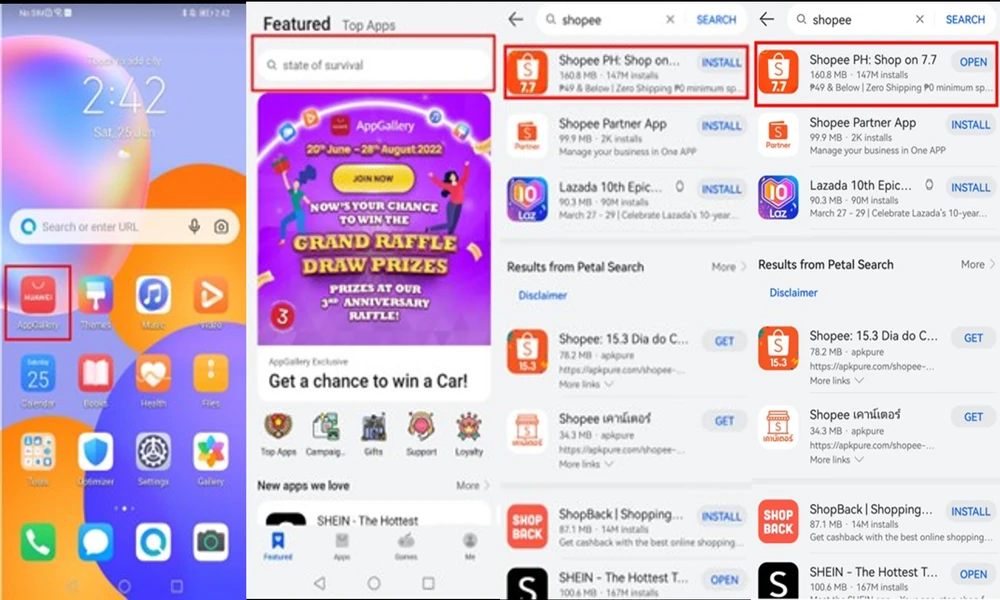
Huawei’s own Community guide for Shopee is straightforward: open HUAWEI AppGallery, search for Shopee, install the app, and start using it. That is the route worth trying first because it keeps the installation tied to Huawei’s official app platform.
If you are looking for Huawei Shopee, begin there instead of downloading a random APK from a search result. Check the app name and publisher, then install only the version shown through the trusted store path.
Set up the account before you need it
After installation, sign in and check the account you actually plan to use. Add or confirm the delivery address, review your phone number, and make sure you can receive verification messages. If you use vouchers or wallet-related features, open them once while you are still on a reliable connection.
Do not wait until checkout to discover that the app needs another login or that an old number is still attached to the account. Five minutes of setup can save a lot of frustration later.
Test the parts you use most
A successful login does not mean the app is fully ready. Search for a product, open reviews, add an item to the cart, check chat, and confirm that notifications arrive. If you often watch Shopee Live or track flash deals, test those too.
For people using Huawei Shopee as a regular shopping app, notifications matter more than they seem. Delivery updates, seller messages, payment reminders, and limited-time offers are easy to miss if background activity is restricted.
Keep payments and updates simple
Use only payment methods you normally trust and avoid changing several security settings at once. If something looks wrong during checkout, stop and confirm the order details instead of repeatedly retrying the payment.
Keep the app updated through the same source you used to install it. Mixing multiple versions from different stores can make login, notifications, or updates harder to troubleshoot.
What to do if something stops working
Shopee’s own troubleshooting guide recommends basic steps first: update the app, check the connection, close and reopen it, clear cache or app data if needed, restart the phone, and reinstall only if the issue continues.
The Huawei Community page linked through Huawei Shopee is a useful reference for the original installation path. In daily use, the best setup is the boring one: one trusted app source, a working account, a verified delivery address, and notifications that actually arrive.
A final check before relying on it
If this phone is your main shopping device, place one low-risk order or go through the checkout steps before you really need the app. That confirms that address selection, seller chat, payment options, and order tracking behave normally on the device.
It also gives you a clear baseline. If the app later breaks after an update or network change, you know it worked before and can troubleshoot the specific change instead of rebuilding the whole setup.